AI usage and token meters
Open alternatives3
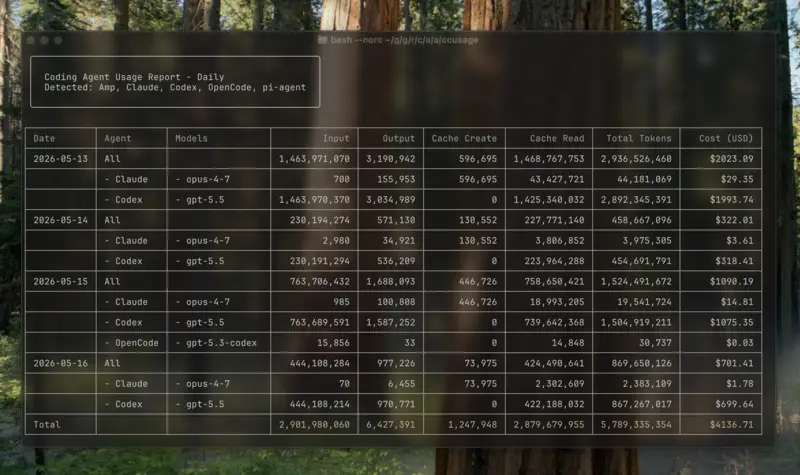
ccusage is a command-line tool that reads local usage records from AI coding assistants and reports how many tokens and how much cost each day, week, month or session used. It is for programmers and people who use AI coding tools and want to track their spending.
Has 3 of 5
How many people bookmarked its code on GitHub. It shows how popular it is, not how good it is or how well it replaces the app.
How hard it is to start using it. Easy: install it like a normal app, or use it in your browser. Advanced: you run it on your own server, use the command line, or it is a tool for developers.
Its code changed within the last year, so someone is still looking after it.
Does the whole job.
Ordered by how fully it replaces the app, Verified, setup and, when there are enough, people's votes.
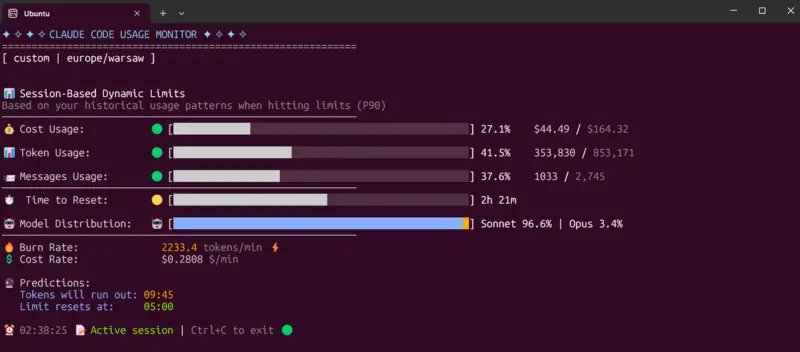
A terminal tool that shows how much of your Claude Code usage limit or token budget you have used, and how fast you are using it. It is aimed at developers who use Claude Code and want to track or spend less of their AI allowance.
Has 4 of 5 · Works with many coding agents ✗
How many people bookmarked its code on GitHub. It shows how popular it is, not how good it is or how well it replaces the app.
How hard it is to start using it. Easy: install it like a normal app, or use it in your browser. Advanced: you run it on your own server, use the command line, or it is a tool for developers.
Its code changed within the last year, so someone is still looking after it.
Does the whole job.
Ordered by how fully it replaces the app, Verified, setup and, when there are enough, people's votes.
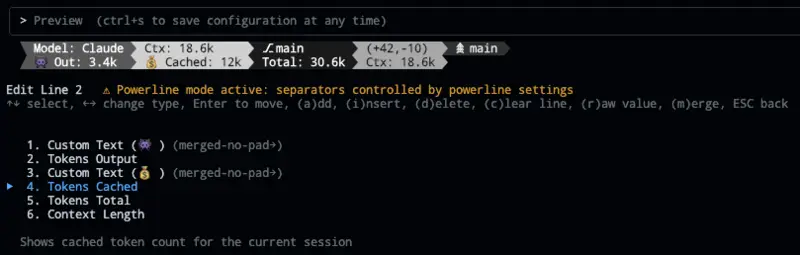
ccstatusline is a free tool that adds a customizable status bar to the Claude Code command-line assistant, showing things like the model, git branch, and token usage. It is for people who use Claude Code in a terminal and want to see these details at a glance.
Has 2 of 5 · Works with many coding agents ✗
How many people bookmarked its code on GitHub. It shows how popular it is, not how good it is or how well it replaces the app.
How hard it is to start using it. Easy: install it like a normal app, or use it in your browser. Advanced: you run it on your own server, use the command line, or it is a tool for developers.
Its code changed within the last year, so someone is still looking after it.
Does the whole job.
Ordered by how fully it replaces the app, Verified, setup and, when there are enough, people's votes.
YesPartlyNoNot checked yet